
how obe turns legal intake into a clean data pipelineOBE Legal Intake CRM: Turning Intake into a Clean Intake Pipeline
How OBE's legal CRM pulls facts from messy documents, organizes team roles without collision, and gives attorneys a reliable dashboard without administrative burnout.
In my previous piece examining Bennett Legal's intake workflow, I looked at how OBE captures qualified leads directly on your firm website through case-specific questionnaires.
This guide explains how OBE's legal intake CRM lets your law firm automate document case fact extraction, organize team responsibilities so nobody steps on each other's feet, give intake workers a dedicated work inbox that shows which priority tasks to complete today, and unify claimant communication in one integrated chat interface.
1. Stop Losing Leads to Long Forms
Most intake forms ask for everything up front. Claimants get overwhelmed, close the tab, and vanish.
Every submission in OBE begins at Stage 1: New. The moment a claimant completes the first step, even if it is just a name and phone number, their record is logged. If they abandon the form halfway through, their partial file remains in your system, ready for follow-up.
From there, OBE triggers an automated abandoned-intake sequence:
- Three targeted reminders sent via the claimant's preferred channel (SMS or email) over a two-week window.
- A single, persistent link that returns them to the exact field where they stopped, with all prior answers saved.
- Filterable follow-up views so intake staff can see anyone who went cold and dial them directly.
Once the claimant completes every initial milestone, the system advances them automatically to Detailed Intake.
Transform Messy Legal Inquiries into Clean Structured Records
Unstructured intake notes force paralegals to spend hours cleaning up files. OBE's deterministic pipeline validates facts as they enter your firm.
2. Document Gathering Without the Chase
Detailed Intake is where legal operations typically stall. Paralegals spend hours emailing back and forth, begging for PDF attachments, and manually organizing folders. I interviewed 34 law firms to pinpoint what burns intake teams out: manual data entry, constantly requesting documents from claimants, and organizing them in messy file systems topped the list.
OBE automates that workflow.
I build the intake pipeline with your firm once per case type. It is as simple as a checklist of required documents per case. If you already have past claimant records, I train each document pipeline on 10 to 15 sample files. I can handle this when you send a ZIP archive per document type, or your team can do it directly by clicking "Create New Pipeline" and uploading sample documents for the machine to extract key fields and train the models.
Once established, the system is permanently ready to extract entities for each new case coming in. The extracted variables become a structured JSON file bound directly to the source document, ensuring your evidentiary records are future-ready for any downstream AI environment, including Claude Cowork, ChatGPT, or custom internal tooling, delivered through authorized, sandboxed MCP access.
┌──────────────────────────────────────────────────────────┐
│                 WORK WITH OBE: TWO PATHS                 │
└──────────────────────────────────────────────────────────┘

Most legal software locks your data into a proprietary silo and rents it back
to you on an endless monthly subscription. I offer a cleaner approach:

[ Option 1: Buy the System Outright - $10,000 (One-Time) ]
• A fully rebuilt intake form tailored to your firm's specific case types.
• Direct website integration handled by me.
• OBE CRM, Client Portal, and Expert Portal self-hosted on your own server.
• Zero monthly SaaS fees. You own the code forever.
• Need custom changes later? Hire me on demand.

[ Option 2: The Managed Platform - $700 / month, 10 seats included ]
• Continuous updates and new features as I ship them.
• Deep integrations with the upcoming legal case management platform.
• Ongoing support and maintenance.
👉  Book a 30-Minute Architecture Call with Tim Ottowitz
Review your firm's current case types and see how structured intake works in practice.
See How Coordinate Bounding Boxes Eliminate Manual Verification
The 50/50 workstation highlights the exact PDF coordinates where facts were extracted, cutting manual verification time down to seconds.
3. The Entity Engine: Solving the LLM "Recency Bias"
When documents are processed through the extraction pipeline, case facts frequently overlap across different legal records.
This introduces a major technical problem with off-the-shelf AI tools: case facts conflict.
Example: A solar arbitration case involves a signed contract, text messages, and an intake interview. The contract lists the loan balance as $42,500. During the interview, the claimant casually estimates it at "$40,000."
Standard language models suffer from recency bias: if you dump every file into a folder in ChatGPT, the model will often trust the latest spoken mention over the signed legal document.
OBE prevents this with a rule-based Entity Engine. The engine assigns strict hierarchies of truth. For financial figures, the signed contract outranks an interview note every time. The result is verified, deterministic data. To see my benchmarking methodology across thousands of test documents, review the legal document extraction evals. For firms struggling with broken handoffs and manual data entry, see the operational problems OBE solves or explore the primary Bennett Legal case study.
Extracted entities populate an organized Factframe on a single screen. In consumer arbitration intake, such as my work with Bennett Legal's solar fraud practice, OBE maps up to 40 distinct case facts into one clean overview. Missing documents appear in an active checklist, showing your staff precisely what to request next.
4. Clear Lanes for the Entire Team: The Prioritized Work Inbox
Handoffs inside law firms are notoriously messy. When team responsibilities overlap, staff step on each other's feet, duplicate outreach, and drop the ball on missing evidentiary records.
OBE organizes work into sequential stages managed by a prioritized Work Inbox. The Work Inbox ensures intake workers and paralegals know precisely which priority tasks need attention today: which files have unverified documents, which claimants need follow-up through the portal, and which matters are ready for attorney sign-off.
Here is the intake manager workflow view inside the OBE platform:
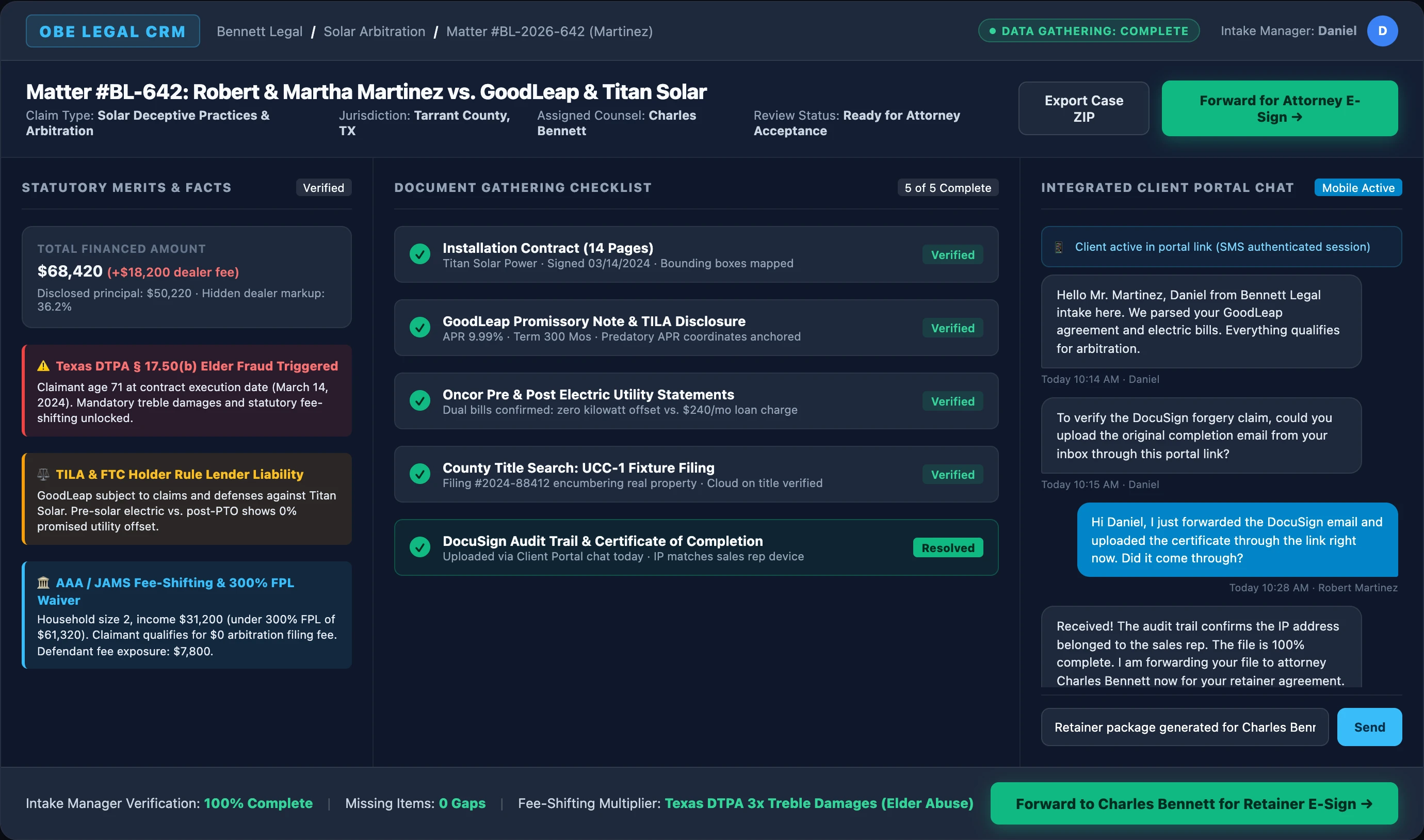
Sequential Phasing and Defined Roles
- Intake Workers: Manage the "New" and "Intake" stages. They run document-gathering checklists, chat with claimants through the integrated client portal, and host follow-up calls through integrated Google Meet links. Meeting recordings can be uploaded, transcribed, and mapped to the case file.
- The Decision Screen: Once all documents are collected, the system presents the verified case facts alongside potential statutory claims. The case manager has two clear buttons: Accept or Decline.
- Decline: Triggers an automated, branded notification explaining the decision with courtesy and finality.
- Accept: Advances the case. If your firm requires prepayment of arbitration filing fees (such as AAA or JAMS fees), the system holds the file here until payment clears.
- Paralegals and Attorneys: The attorney reviews the file. With one click, they can kick the case back with specific notes for the intake team, or approve it. Approving instantly generates an engagement agreement populated with all case variables, applies the attorney's signature, and emails an access link to the client portal. The claimant opens the link and signs immediately on their phone.
5. You Own Your Data (MCP Sandboxes and Full Exports)
Legal platforms often hold firm data hostage behind rigid interfaces. OBE is built as an open data layer:
- Complete ZIP Export: At any point, download an entire case as a self-contained ZIP archive. It includes all raw documents, an indexed case map, and a PDF summary of all extracted facts. Upload it to legacy case management, work offline on your laptop, or analyze it in local AI environments.
- MCP Sandboxed Access: I equip every firm with private Model Context Protocol (MCP) servers. Every sandbox provides secure, non-destructive access to the case file system and structured JSON data. This makes the system versatile for firms using Slack, ChatGPT, Claude Cowork, or command-line developer tools.
I see a future where OBE becomes the sovereign data engineering backend for your case data, and you decide where you desire to work with it.
Do Not Get Scammed Twice: Statutory Fee-Shifting vs. Upfront Retainers
When claimants seek legal redress for statutory violations, consumer fraud, or employment misclassification, they are often intercepted by unregulated marketing outfits demanding substantial upfront retainers before evaluating case merits.
Modern fee-shifting statutes across federal and state law (including TILA, TCPA, FDCPA, and state consumer codes) explicitly place financial responsibility on corporate defendants. These statutory frameworks ensure that qualifying claimants obtain full legal representation without incurring out-of-pocket costs.
OBE's intake pipeline extracts financial terms, flags potential statutory violations for attorney review, and builds verified, review-ready case files directly for plaintiff firms operating on a fee-shifting model.
Find the Right Intake Software and Developers for Your Firm
Want to see how OBE turns messy intake into a clean intake pipeline?
👉 Schedule a Consultation with Tim Ottowitz to Review Your Case Type
I will inspect your current intake forms, audit your document verification workflows, and demonstrate how OBE delivers review-ready case packages.